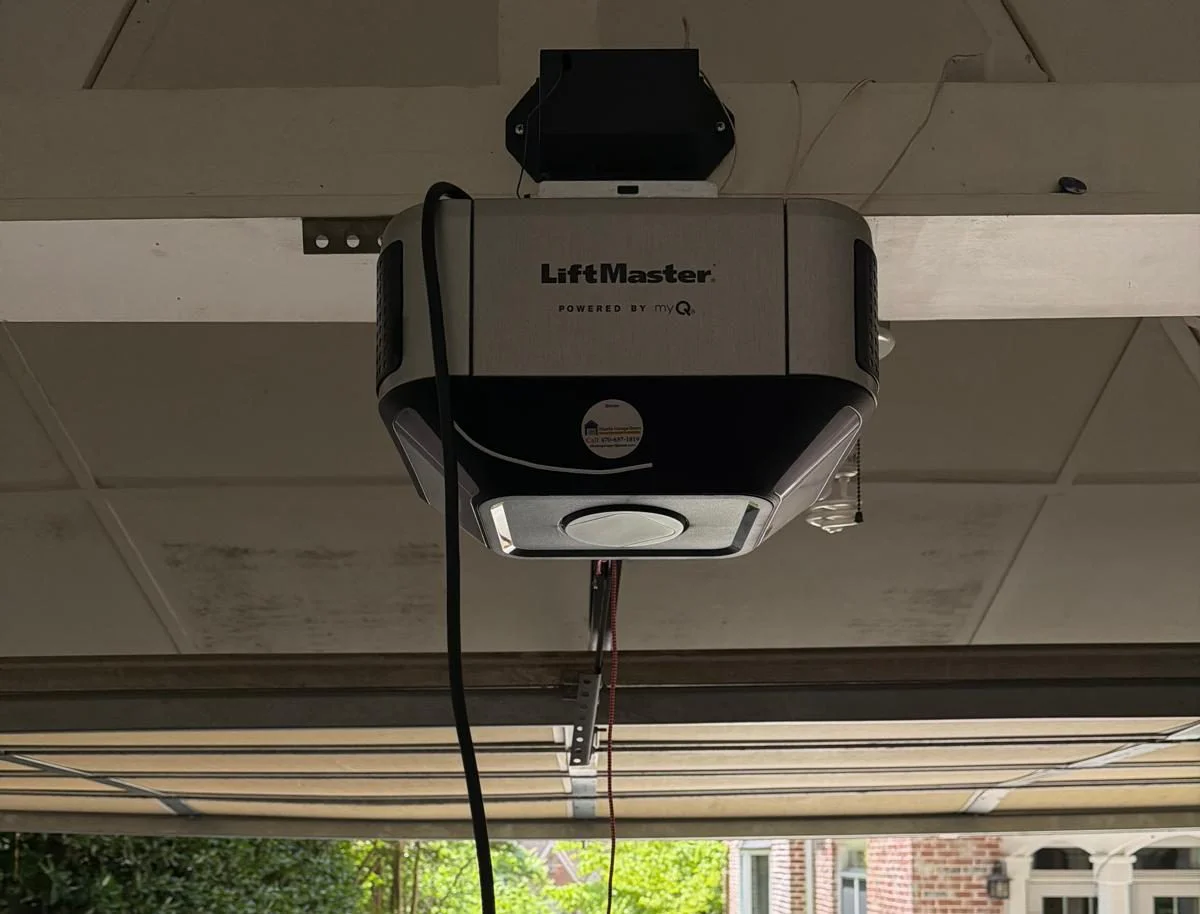

How To Re-engage LiftMaster Garage Door

How to Replace Weather Stripping on Bottom of Door

If your LiftMaster opener has suddenly stopped responding to remotes, wall panels, or your smartphone app, you are not alone. This is one of the most common service calls we handle in Atlanta. The good news is that most re-engagement problems are not mechanical failures. They are communication errors. And in many cases, you can fix them in under ten minutes without touching a single tool.

We have worked on hundreds of LiftMaster units across older neighborhoods like Virginia-Highland and newer developments in Buckhead. The same three or four issues keep showing up. Losing power, tripped safety sensors, and forgotten programming steps cause the vast majority of lockouts. Before you call for a service visit, try these steps. They will save you time and money.

Key Takeaways

  • Most LiftMaster re-engagement issues are caused by power interruptions or sensor misalignment, not broken motors.
  • The “learn” button on your opener is your primary tool for reconnecting remotes and keypads.
  • If your door is unresponsive, check the safety sensor beams first. They are the most common hidden culprit.
  • A full factory reset should be your last resort, not your first step.
  • Some problems, especially with circuit boards or wiring, require professional diagnosis.

Why Your LiftMaster Suddenly Stopped Responding

We see this pattern all the time. A homeowner opens the door, runs an errand, comes back, and the remote does nothing. The wall button does nothing. The app shows the door is offline. Panic sets in. People assume the motor burned out or the door is broken.

In reality, the most common cause is a simple power cycle. If the opener lost power for even a split second, it can forget its paired devices. This happens more often than you would think during summer thunderstorms in Atlanta. A brownout or a surge can scramble the memory without tripping a breaker.

Another frequent issue is the safety sensor system. LiftMaster openers are designed to refuse all commands if the sensors are blocked or misaligned. This is a safety feature, but it looks like a total failure. The door will not move, and the remotes will appear dead. The fix is usually just cleaning the lenses or adjusting the brackets.

The Real First Step: Check the Obvious

Before you climb a ladder or dig out the manual, look at the opener unit itself. Is the power light on? If it is off, check the outlet and the breaker panel. We have responded to calls where the only problem was a tripped GFCI outlet in the garage. That is a five-second fix.

Next, look at the safety sensors mounted on each side of the door track, about six inches off the ground. They should have small LED lights. One sensor emits a beam, and the other receives it. If the receiving sensor’s light is off or blinking, the beam is interrupted. This could be caused by a cobweb, a storage box pushed too close, or a bracket knocked loose by a bump.

If both sensor lights are solid, move on to the wall control panel. Press and hold the button for three seconds. Some LiftMaster models require a long press to wake the system from a soft lockout. If the door moves, you just saved yourself a service fee.

Using the Learn Button to Reconnect Devices

This is the core of re-engaging a LiftMaster opener. The “learn” button is located on the back or side of the motor unit, usually under a small plastic cover. It is typically purple, yellow, or red, depending on the model year.

To reconnect a remote:

  1. Press and release the learn button. A small LED will turn on.
  2. Within 30 seconds, press and hold the button on your remote that you want to pair.
  3. Hold it until the opener’s lights flash or you hear a click. That confirms the connection.

We recommend doing this for each remote individually. Do not try to program multiple remotes at once. It rarely works, and you will end up confused about which one paired and which did not.

If you have a wireless keypad, the process is slightly different. You still press the learn button, but then you enter a four-digit PIN on the keypad and press the enter button. The opener will flash to confirm. Write down that PIN. We cannot tell you how many times customers call us because they forgot the code they set two years ago.

When the Wall Control Is Dead

Sometimes the wall control panel is completely unresponsive. No lights, no beeps, nothing. This usually points to a wiring issue between the panel and the opener. The wall control runs on low voltage, and the wires are thin. They can get nicked by staples during installation or chewed by rodents.

If you have a multimeter, you can test for voltage at the back of the wall control. If there is no power, trace the wire back to the opener terminals. Look for breaks or loose connections. If you are not comfortable with electrical testing, this is a good time to call a professional. Messing with low-voltage wiring is not dangerous, but it can be frustrating if you do not know what you are looking for.

In older Atlanta homes, we often find that the original wiring was run through unfinished garage walls. Over decades, those wires can corrode or get pinched. Replacing them is tedious but straightforward for someone with experience.

Factory Reset: The Nuclear Option

If none of the above works, you may need to perform a factory reset. This clears all paired devices and returns the opener to its default state. It is a last resort because you will have to reprogram everything from scratch.

To factory reset most LiftMaster openers:

  • Press and hold the learn button for about six seconds. The LED will turn off, then back on.
  • Release the button. All memory is now cleared.

After the reset, you must reprogram every remote, keypad, and smartphone app connection. This is tedious, but it solves stubborn lockout issues that nothing else fixes.

We only recommend this if you have already ruled out power issues, sensor problems, and wiring faults. A factory reset will not fix a broken circuit board or a failed logic board. If the door still does not respond after a reset, the problem is likely hardware-related.

Smartphone App Reconnection

If your LiftMaster opener is Wi-Fi enabled and you use the myQ app, re-engaging the app connection is a separate process. The app does not use the learn button. It requires you to put the opener into Wi-Fi learn mode.

On most newer models, you press and release the learn button twice in quick succession. The LED will start blinking blue. Then you open the app, follow the prompts to connect to your home network, and enter the Wi-Fi password.

A common mistake we see is people trying to connect the app while the opener is already paired to a different network. If you changed your internet service provider or router, you must reset the Wi-Fi module in the opener first. This is done by holding the learn button for six seconds, then doing the double-press for Wi-Fi learn mode.

The app is convenient, but it relies on your home Wi-Fi network. If your router is far from the garage, the signal may be weak. We have installed Wi-Fi extenders for customers in large homes in Druid Hills who could not get a stable connection. That usually solves the problem.

Common Mistakes That Keep the Door Locked

Over the years, we have seen the same mistakes repeated. Here are the ones that waste the most time.

Forgetting the Lockout Feature

Some LiftMaster wall controls have a lock button. If someone accidentally presses it, the opener ignores all remote signals. The lock button often has a small padlock icon. If that light is on, press and hold the lock button for two seconds to disable it. This is embarrassingly common and incredibly easy to fix.

Ignoring the Battery in the Remote

Remotes do not last forever. A weak battery can cause intermittent failures. The door might open sometimes but not others. Replace the battery first before assuming the opener is broken. CR2032 batteries are the standard for most LiftMaster remotes. Keep a few spares in the house.

Assuming the Sensors Are Fine

We mentioned this earlier, but it deserves repeating. The safety sensors are the most overlooked component. People check the power, check the remote, check the wall button, and never look down at the sensors. A misaligned sensor by just a quarter-inch can stop the door from closing. The opener will still open, but it will refuse to close. This confuses homeowners because the door seems to work partially.

When to Call a Professional

Not every problem has a DIY solution. If you have tried the learn button, checked the sensors, verified power, and performed a factory reset, and the door still does not respond, you likely have a hardware failure.

Common hardware issues include:

  • A burned-out logic board from a power surge
  • A failed capacitor on the motor unit
  • Broken gears inside the opener head
  • Damaged wiring in the garage ceiling

These repairs require specific tools and diagnostic equipment. We have seen homeowners make things worse by trying to replace a logic board without disconnecting power. It is not worth the risk.

If you live in Atlanta and need professional help, Atlanta Garage Doors located in Atlanta, GA can diagnose and repair most LiftMaster issues in a single visit. We carry common replacement parts on the truck, so we rarely need to schedule a second trip.

Cost vs. Time: The Real Trade-Off

There is a practical decision to make here. How much is your time worth? If you enjoy troubleshooting and have an hour to spare, DIY is fine. But if you have a busy schedule, paying for a service call might be cheaper than losing a Saturday afternoon.

The average cost for a professional diagnostic visit in Atlanta runs between $75 and $125. Most repairs, like sensor realignment or remote programming, are quick and inexpensive. Major component replacements cost more, but they come with a warranty. DIY repairs do not.

We have had customers spend three hours trying to program a keypad, only to find out the keypad itself was defective. That is frustrating. A professional would have tested the keypad with a multimeter in two minutes and confirmed the failure.

Real-World Scenarios We Have Seen

One customer in Decatur had a LiftMaster that stopped working every time it rained. They assumed water was getting into the motor. After tracing the issue, we found that the safety sensor wire had a crack in the insulation. When the humidity rose, the crack caused a short. The sensors appeared to work, but the signal was intermittent. We replaced the wire, and the problem vanished.

Another homeowner in Midtown called us because their door would open but not close. They had replaced the remotes, reprogrammed everything, and even bought a new wall panel. The issue was a single cobweb on the sensor lens. We cleaned it with a dry cloth, and the door worked perfectly. They were relieved and embarrassed at the same time. We told them not to worry. It happens all the time.

These stories illustrate why we always start with the simplest checks. You would be surprised how often the fix is trivial.

Alternatives to LiftMaster Openers

If your opener is old and failing repeatedly, you might consider replacing it rather than repairing it. LiftMaster is a solid brand, but no product lasts forever. The average lifespan of a garage door opener is 10 to 15 years. If yours is older than that, the cost of repairs might exceed the value of the unit.

Newer openers offer battery backup, Wi-Fi connectivity, and quieter belt-drive motors. These are especially useful in Atlanta, where power outages from storms are common. A battery backup means you can still open and close your door even when the grid is down.

If you are on the fence, compare the cost of a major repair to the price of a new opener. A logic board replacement can run $200 to $300. A new opener installed is often $400 to $600. The math favors replacement if the unit is old.

When Our Advice May Not Apply

This article assumes your LiftMaster opener is in good physical condition. If your door is physically damaged, the tracks are bent, or the springs are broken, none of the electronic troubleshooting will help. Those are mechanical problems that require different solutions.

Also, if you have an older model from the 1990s or early 2000s, the programming process may differ. Some older units use dip switches instead of a learn button. You will need the original remote or a universal remote that supports dip-switch programming. Check the manual for your specific model.

Finally, if you are uncomfortable working with electricity or climbing ladders, stop. Call a professional. Your safety is more important than saving a few dollars. Garage door openers are heavy, and the springs are under extreme tension. We have seen injuries that could have been avoided.

Wrapping This Up

Re-engaging a LiftMaster garage door opener is usually a simple process. Start with the power supply. Check the sensors. Use the learn button to reconnect remotes. If none of that works, consider a factory reset. If the door still does not respond, you likely have a hardware problem that needs professional attention.

The key is to stay calm and work through the steps methodically. Do not skip the obvious checks. Do not jump to the nuclear option. And if you get stuck, know that help is available.

For homeowners in the Atlanta area, Atlanta Garage Doors located in Atlanta, GA offers same-day service for LiftMaster issues. We have seen it all, and we can get your door moving again quickly.

Whether you fix it yourself or call for help, the goal is the same: a working door that keeps your home secure and your daily routine on track.

Related Articles

People Also Ask

To reengage your LiftMaster garage door opener, you will need to locate the emergency release cord, which is typically a red handle hanging from the overhead track. Pull this cord straight down to disengage the opener from the trolley. This allows you to operate the door manually. To reengage, lift the garage door slightly until you hear a click, indicating the trolley has reconnected to the carriage. Then, pull the cord toward the motor unit to lock it back into place. For a smooth process, ensure the door is fully closed before reengaging. If you encounter resistance, check the track alignment. For professional assistance, Atlanta Garage Doors can provide reliable service for any opener issues.

To reengage your garage door, the most common solution involves resetting the automatic opener. First, ensure the door is fully closed. Then, locate the emergency release cord, which is usually a red handle hanging from the opener rail. Pull this cord straight down to disengage the door from the trolley. You can now move the door manually. To reconnect, pull the cord toward the door while moving the trolley until it locks back into the carriage. If the opener still will not engage, check for a tripped breaker or a sensor blockage. For a complete step-by-step guide, please read our internal article titled How To Reengage A Garage Door. For professional assistance, Atlanta Garage Doors can inspect your opener system to ensure safe operation.

To restart a LiftMaster garage door opener, first locate the power cord and unplug it from the electrical outlet. Wait for at least 60 seconds to allow the internal electronics to fully reset. After this pause, plug the unit back in. You should hear a beep, and the opener's lights will flash, indicating a successful reboot. If your model has a wall control panel, you can also press and hold the "Learn" or "Smart" button for about 6 seconds until the LED light turns off, then release it. This clears any minor errors. For persistent issues, check that the safety sensors are aligned and clean. If problems continue, Atlanta Garage Doors recommends consulting your owner's manual or contacting a professional technician for a thorough inspection.

To reconnect your garage door after pulling the red emergency release cord, first ensure the door is fully closed. Pull the red cord again to reset the mechanism, then manually lift the door until it is about halfway open. Next, push the door back down firmly to re-engage the trolley with the carriage. You should hear a distinct click when the connection is made. Finally, test the automatic opener by pressing the wall button or remote. If the door does not move, check that the trolley is properly aligned. For persistent issues, Atlanta Garage Doors recommends inspecting the release cord and springs for damage before attempting further operation.

To re-engage your LiftMaster or Chamberlain garage door opener after a manual release, you need to pull the red emergency release cord toward the door to reset the carriage. Then, manually push the door until it locks back into the trolley. You will hear a distinct click when it re-engages. If the door does not reconnect, the carriage may be misaligned with the opener rail. For a step-by-step visual guide on this process, please refer to our internal article titled How To Reengage Garage Door Remote. Atlanta Garage Doors recommends checking the release cord tension and ensuring the track is clear of debris before attempting to re-engage the opener.

A common reason a LiftMaster garage door trolley is not catching is that the carriage assembly may be out of alignment or the release cord has been pulled. First, check if the red emergency release cord is disengaged; you can often reset it by pulling the cord toward the door and then moving the trolley back to the closed position. If the trolley still will not connect, inspect the drive gear and the trolley's catch mechanism for wear or debris. At Atlanta Garage Doors, we recommend lubricating the rail and ensuring the traveler is fully seated. If the issue persists, the trolley's internal teeth may be stripped, requiring a replacement part. For a precise diagnosis, a professional technician can verify the opener's limits and safety sensor alignment.

If you have pulled the emergency release cord on your garage door opener, the door will operate manually until you reset the mechanism. First, ensure the garage door is fully closed. If it is not, you must manually lower it, being careful as the spring tension can make the door heavy. Next, pull the emergency release cord toward the motor unit until you hear a click, which indicates the trolley has re-engaged with the carriage. After that, you can use your wall button or remote to operate the door. If the door does not move, you may need to manually pull the cord again and repeat the process. For detailed steps specific to your model, please refer to our internal article How To Reset Garage Door After Pulling Emergency Release LiftMaster. For professional assistance, Atlanta Garage Doors can help ensure your system is functioning safely.

If your LiftMaster garage door trolley is damaged or worn, replacing it is a careful process. First, ensure the door is fully closed and disconnect the opener from power. You must release the door from the opener by pulling the emergency release cord. For guidance on re-engaging the system after this step, refer to our internal article How To Reset Garage Door After Pulling Emergency Release LiftMaster. To replace the trolley, you will need to disconnect the carriage assembly from the rail, remove the old trolley, and install the new one, ensuring all fasteners are tight. The new trolley must be properly aligned with the drive mechanism. If you are not comfortable with this mechanical work, Atlanta Garage Doors recommends hiring a professional to avoid damage to the opener or door.

To reset your garage door opener keypad, first locate the "Learn" button on the motor unit, typically found near the antenna wire. Press and release this button; you will have about 30 seconds to complete the next step. On the keypad, enter a new four-digit personal identification number (PIN) and then press the "Enter" button. The opener lights should flash to confirm the reset. For models with a sliding cover, you may need to slide the cover open to access the programming button. If the keypad does not respond, check the batteries and ensure the keypad is within range of the opener. For specific instructions on resetting after using the emergency release, refer to our internal article titled How To Reset Garage Door After Pulling Emergency Release LiftMaster.

Google Facebook

Overall Rating

5.0
★★★★★

516 reviews

Call Now